Best Budget Laptops Under $500 in 2026: 5 Picks That Get the Job Done
Shopping for the best budget laptops under $500 used to mean settling — slow, plasticky, frustrating. In 2026, that story’s changed. Efficient processors, cheap SSDs, and brutal competition mean a $400–500 laptop can handle schoolwork, office tasks, streaming, and video calls without embarrassing itself. The trick is knowing which cheap laptops are genuine bargains and which are cheap for a reason.
We’ve dug through the budget bin and found five laptops under $500 actually worth your money — machines with decent screens, usable keyboards, and enough performance to stay useful for years. No 64GB-storage traps, no 1366×768 screens from 2012.
Disclosure: This article contains affiliate links. As an Amazon Associate, we earn from qualifying purchases. We may also earn commissions from Daraz and AliExpress purchases made through links on this page, at no extra cost to you.
What $500 Actually Buys in 2026
Let’s be honest about expectations. A sub-$500 laptop in 2026 typically gets you: a current-generation budget processor (Intel Core i3/N-series, AMD Ryzen 3/5, or Snapdragon X in some models), 8GB of RAM, a 256GB SSD, and a 1080p display. That’s a genuinely usable computer for writing, spreadsheets, web research, streaming, and video calls — which covers most of what people actually do.
What it doesn’t get you: premium build (expect plastic), a great display (fine, not stunning), all-day battery (usually 6–9 hours real-world), or headroom for demanding work like video editing or gaming. And two traps to dodge: laptops with only 4GB of RAM or 64–128GB of slow eMMC storage — frustrating on day one, unusable by year two. Every pick below clears those bars.
The budget sweet spot is $400–500. Below $300 you’re mostly looking at Chromebooks or refurbished machines (both legit options, covered below); above $500 you’re in midrange territory, where our college laptop guide takes over.
Budget Laptop Buying Guide: What to Look For
1. Insist on 8GB RAM and a real SSD
This is the single most important rule in budget laptops. 8GB of RAM is the minimum for smooth Windows use in 2026; 4GB models stutter with a few browser tabs open. And the storage has to be an SSD (256GB ideally) — not eMMC flash, which is far slower. A laptop with 8GB/256GB SSD will feel twice as fast as one with 4GB/eMMC, even with the same processor.
2. Don’t accept a bad screen
The most common budget corner-cut is the display: dim 1366×768 TN panels that look washed out from any angle. Say no. In 2026, plenty of sub-$500 laptops ship 1080p IPS screens — hold out for one. You’ll stare at this screen for thousands of hours; a decent panel is worth more than a slightly faster chip.
3. Check the processor generation
Budget laptops sometimes ship with processors several generations old. Current Intel N-series/Core i3, AMD Ryzen 3/5 7000-series or newer, and Snapdragon X chips are all fine. Anything older will show its age. If a deal looks too good, check the chip’s release year — a 2026 laptop with a 2021 processor isn’t a deal.
4. Consider refurbished and Chromebooks
Two legit ways to stretch $500 further: manufacturer-refurbished business laptops (a two-year-old ThinkPad or Latitude usually beats a new budget laptop on build quality), and Chromebooks (if your work lives in a browser, a $300 Chromebook Plus is faster and simpler than a $300 Windows laptop). A compact GaN charger helps too — budget laptops often ship with bulky bricks.
The 5 Best Budget Laptops Under $500 in 2026
1. Acer Aspire Go 15 — Best Budget Laptop Overall
The Acer Aspire Go 15 takes our best budget laptop pick under $500 because it nails the fundamentals: a 15.6-inch 1080p display, a capable Intel Core i3-N series or Ryzen processor, 8GB of RAM, and a 256GB SSD — regularly around $350–430. That’s the full usable-computer checklist at a price that fits any budget.
It’s not exciting: the plastic chassis is plain, the speakers are thin, and the battery gives you a workday-ish 7 hours rather than all-day. But the keyboard is comfortable, the screen is honest 1080p, and performance covers schoolwork, office apps, and streaming without complaint. When someone asks for the cheapest laptop that’s still actually good, this is the answer.

Pros: Excellent price; 1080p display; 8GB RAM + SSD standard; comfortable keyboard.
Cons: Plain plastic build; average battery life; weak speakers.
Best for: Anyone who needs the cheapest genuinely good Windows laptop.
2. Lenovo IdeaPad Slim 3 — Best Build Quality Under $500
The Lenovo IdeaPad Slim 3 costs a bit more than the Acer (around $450–500) and spends it where you’ll feel it: a sturdier chassis, a better keyboard, cleaner design. Current configurations offer Ryzen 5 or Intel Core i5 options with 8GB RAM and 512GB SSD at the top of the budget — double the storage of most rivals.
Lenovo’s keyboards stay good even at this price, which matters if you type all day. The 15.6-inch 1080p display is solid, battery life is a respectable 7–8 hours, and it looks like a pricier machine. If your budget stretches to $500, this is where the extra $50–100 over the cheapest options pays off most visibly.
Pros: Better build and keyboard than cheaper rivals; 512GB SSD options; clean design; solid display.
Cons: At the top of the budget; no backlit keyboard on base models; middling webcam.
Best for: Buyers who can stretch to $500 and want the nicest-feeling budget laptop.
3. HP 15s (Ryzen) — Best Big-Screen Budget Pick
The HP 15s with AMD Ryzen processors is the budget laptop for people who want maximum screen. The 15.6-inch 1080p display gives you room to breathe, Ryzen 5 configurations deliver the strongest performance in this price class, and HP’s pricing is aggressive — Ryzen models regularly dip to around $400–480.
Ryzen’s integrated graphics are also the best you’ll find under $500, which helps with light photo editing and casual games. The trade-offs are standard budget fare: plastic build, average battery, and HP’s preinstalled software needs an afternoon of cleanup. But for raw capability per dollar with a big screen, it’s hard to beat.
Pros: Strong Ryzen performance; big 15.6″ 1080p screen; best integrated graphics under $500; frequent discounts.
Cons: Plastic chassis; bloatware needs removing; average battery life.
Best for: Anyone prioritizing screen size and performance per dollar.
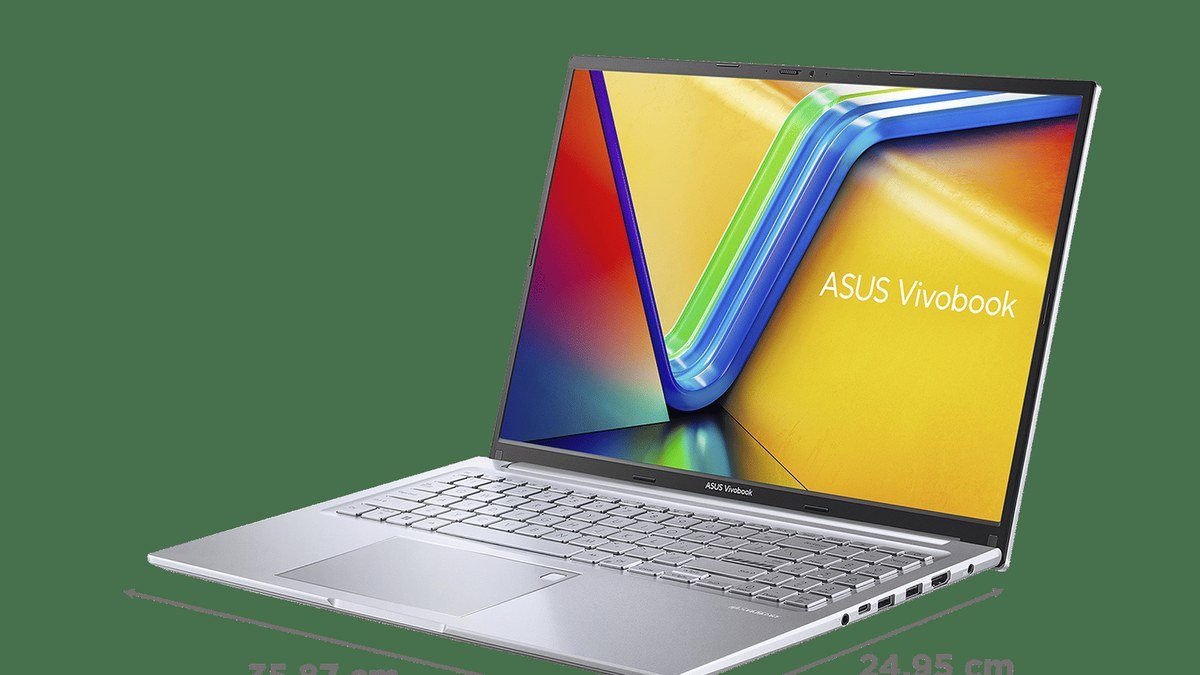
4. Asus Vivobook Go 15 — Best Lightweight Budget Laptop
Most budget laptops are chunky; the Asus Vivobook Go 15 is the exception. At around 3.5 pounds it’s noticeably easier to carry than the typical 4+ pound budget 15-incher, and the slim profile looks modern. Specs follow the budget formula — Ryzen or Intel processors, 8GB RAM, 256GB SSD, 1080p display — for around $400–480.
Asus also throws in niceties rivals skip: a fingerprint reader on some configurations, decent speakers, and military-grade durability testing across the Vivobook line. The keyboard is good, the trackpad is fine, and it’s the budget pick we’d hand to a student who walks everywhere.

Pros: Light and slim for the price; fingerprint reader on some models; good keyboard; durable.
Cons: Display is just okay; battery life is average; limited port selection.
Best for: Students and commuters who want a portable budget laptop.
5. Acer Chromebook Plus 515 — Best Chromebook Under $500
Here’s the honest truth: if your work lives in a browser — Google Docs, Gmail, Canvas, Netflix, Zoom — a Chromebook Plus is a better $400 computer than a $400 Windows laptop. The Acer Chromebook Plus 515 boots in seconds, gets 10+ hours of battery, never bogs down with updates, and the “Plus” badge guarantees a good processor, 8GB RAM, and a 1080p display.
The limitation is software: no full desktop apps (no full Photoshop, no Windows-only programs). But with web apps and Android apps covering most needs, that’s a smaller sacrifice than it used to be. Around $350–450, it’s the simplest, most reliable cheap laptop you can buy — perfect as a school machine or a second computer.
Pros: Fast, simple, and secure; excellent battery life; great value; zero maintenance.
Cons: No full desktop software; needs internet for some tasks; limited offline capability.
Best for: Browser-based users, students on Google Workspace, and anyone who wants simplicity.
Best Budget Laptops Under $500: Comparison Table
| Laptop | Key specs | Around | Best for |
|---|---|---|---|
| Acer Aspire Go 15 | 15.6″ 1080p, Core i3-N/Ryzen, 8GB/256GB SSD | ~$400 | Best overall budget |
| Lenovo IdeaPad Slim 3 | 15.6″ 1080p, Ryzen 5/i5, 8GB/512GB SSD | ~$480 | Best build quality |
| HP 15s (Ryzen) | 15.6″ 1080p, Ryzen 5, 8GB/256GB SSD | ~$440 | Big screen + performance |
| Asus Vivobook Go 15 | 15.6″ 1080p, Ryzen/Intel, 8GB/256GB SSD | ~$440 | Lightweight pick |
| Acer Chromebook Plus 515 | 15.6″ 1080p, 8GB RAM, ChromeOS | ~$400 | Best Chromebook |
Frequently Asked Questions
Can you get a good laptop for under $500 in 2026?
Yes — genuinely. The floor for a usable laptop has risen: 8GB RAM, 256GB SSDs, and 1080p displays are standard even at $400 now. What you give up versus $1,000 machines is build quality, display excellence, battery life, and performance headroom — not basic usability.
What should I avoid in a budget laptop?
Three red flags: 4GB of RAM (too little for Windows in 2026), eMMC storage instead of an SSD (much slower), and sub-1080p TN displays (washed out and dim). Also watch for old processors — check the chip’s generation, not just the brand name.
Is a Chromebook better than a cheap Windows laptop?
For browser-based work, yes — a $400 Chromebook Plus is faster, simpler, and longer-lasting than a $400 Windows laptop. For software that needs Windows or macOS (Office desktop apps, Adobe software, engineering tools), you need Windows. Match the machine to your software, not the price tag.
How long will a $500 laptop last?
Expect 3–4 years of comfortable use for everyday tasks — less if your needs grow. The 8GB RAM / SSD baseline is what makes this possible; those specs keep budget machines viable far longer than the 4GB/eMMC machines of the past. Treat it well and it won’t embarrass you.
Should I buy refurbished instead of a new budget laptop?
Often yes. A manufacturer-refurbished business laptop (ThinkPad, Latitude, EliteBook) from 2–3 years ago usually has better build quality, keyboard, and screen than a new $500 consumer laptop, at a similar price — with a warranty. It’s the savvy buy if you don’t mind a slightly older design. Pair it with a good power bank since older batteries may be tired.
Final Verdict
The Acer Aspire Go 15 is the best budget laptop under $500 for most people — it covers every fundamental at the lowest price. Stretch to the Lenovo IdeaPad Slim 3 for better build quality, pick the HP 15s (Ryzen) for maximum performance per dollar, grab the Asus Vivobook Go 15 if you’ll carry it daily, or go Chromebook Plus 515 if your life is in a browser. Whatever you choose, verify 8GB RAM, an SSD, and a 1080p screen before buying. You can also compare budget laptop deals on Daraz or find laptop accessories on AliExpress to complete your setup.
Where to Buy: Compare Prices on Daraz · Check AliExpress Price
Check the price on AliExpress — the global marketplace with millions of tech products.
As an AliExpress affiliate, we may earn a commission on qualifying purchases.