Ever recorded a video, forgotten the next sentence, stopped, started again — and repeated that five more times? The best teleprompter app for your workflow ends that cycle. It puts your script right next to your camera lens, scrolling at your pace, so you can deliver clean takes without memorizing lines or doing twenty retakes.
Here’s the good news this guide is built around: you might not need to pay at all. For quick talking-head videos, the free teleprompter tools already inside TikTok, Instagram, and CapCut are genuinely adequate — and there’s a completely free browser option that needs no account. But if you want an all-in-one workflow from script to published video, one paid-leaning app stands above the rest. This guide compares them honestly: what each does well, where the free tiers stop, and which one fits how you actually create.
What a Teleprompter App Actually Does (and Doesn’t Do)
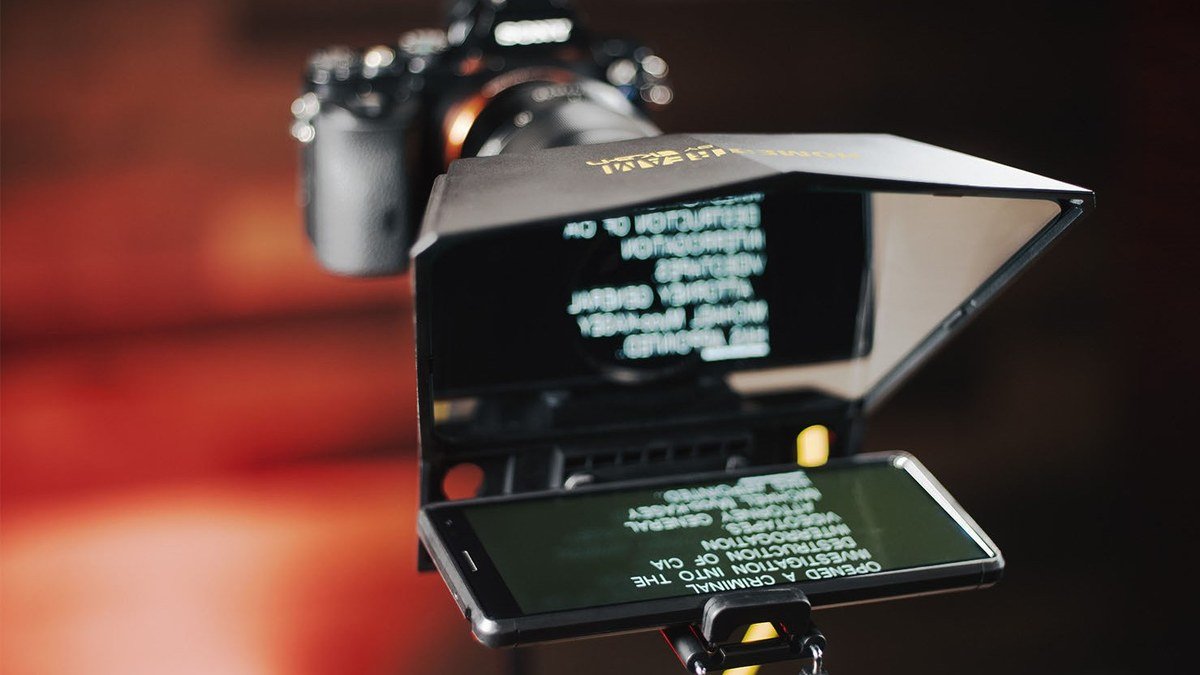
A teleprompter app displays your script as scrolling text positioned close to your camera, so your eyes stay near the lens while you read. The core variables: scroll speed control, text size and formatting, whether it records video at the same time, and — on fancier apps — voice tracking (the text follows your speech instead of a fixed speed) and text mirroring for hardware teleprompter rigs.
What it won’t do: make you a better speaker overnight. A prompter reduces retakes and forgotten lines; delivery, energy, and pacing are still on you. Also worth knowing: most “free” teleprompter apps are free with limits — watermarks, script-length caps, or locked features. The genuinely free options in this guide are the exception, not the rule, which is why they’re worth knowing about.
How to Choose the Right Teleprompter App
1. Match the app to your recording style
Record on your phone and edit elsewhere? A simple scrolling app (or a free browser prompter on a second screen) is enough. Want script-to-published-video in one place — captions, branding, vertical crops for Shorts? You need an all-in-one like BIGVU. Don’t pay for a workflow you won’t use.
2. Check the free tier’s real limits before committing
“Free” usually means something specific: a watermark on exports, a cap on script length, or voice-tracking locked behind a subscription. Before building a workflow around an app, test the free tier with a real script and confirm the output has no watermark — and that the features you need are actually included.
3. Consider voice tracking if you ad-lib
Fixed-speed scrolling punishes anyone who pauses, emphasizes, or goes off-script — the text marches on without you. Voice-tracked prompting follows your speech and waits when you pause. If your delivery is natural and unscripted-feeling, this feature matters more than anything else.
4. Think about hardware if you plan to upgrade
Planning to buy a physical teleprompter rig (beam-splitter glass in front of your camera) later? You’ll need an app with text mirroring and ideally remote control. Not every app supports this — worth checking now rather than switching apps mid-upgrade.
The Best Teleprompter Apps in 2026
BIGVU — best all-in-one for creators
BIGVU is the most complete teleprompter app for creators who want everything in one place. Write or paste your script (there’s an AI script-writing assistant for first drafts), set the scroll speed, and record with the text floating next to the lens. After recording, you can trim, add automatic captions, apply branding, fix eye contact with its AI Eye Contact feature, and crop vertical versions for Shorts and Reels — then publish directly. With around 12 million users, it’s the most widely used mobile teleprompter app, and unusually, its free plan includes actual teleprompter recording rather than a demo. The catch: full AI features and the best export options sit behind the Pro subscription, and it’s less suited to studio hardware rigs than specialist apps.
Pros:
- Complete workflow: script → record → edit → captions → publish in one app
- AI Eye Contact Fix and AI script writer are genuinely useful
- Free plan includes real teleprompter recording
- Works on iOS, Android, and web
Cons:
- Pro subscription needed for full AI features and best exports
- Onboarding flow before you can start; less ideal for hardware rigs
Best for: YouTubers, coaches, and marketers who want one app from script to published video.
TikTok, Instagram & CapCut built-ins — best free quick option
Before downloading anything, check the apps you already have. TikTok, Instagram, and CapCut all include basic teleprompter functionality in their camera or creation tools — paste or type your script and it scrolls while you record. They’re not flexible (limited speed control, minimal formatting, no voice tracking), but for a 60-second talking-head video they’re completely adequate. And the price is right: free, no account beyond what you have, no watermark games. This is where beginners should start.
Pros:
- Completely free with tools you already use
- Zero setup — script and record in the same app
- Fine for short-form talking-head content
Cons:
- Limited scroll speed and formatting control
- No voice tracking, no hardware mirroring, no advanced export
Best for: Beginners and short-form creators who want to try prompting with zero commitment.
CuePrompter — best fully free browser option
CuePrompter runs entirely in your web browser: paste your script, press start, and it scrolls. No install, no account, no watermark, no script-length games. It even offers mirroring for compatible hardware teleprompter rigs — remarkable for a free tool. The trade-off is simplicity: fixed-speed scrolling only, no recording, no editing, no voice tracking. Pair it with a second screen or tablet next to your camera and it’s a legitimate free prompter for desktop-recorded videos.
Pros:
- 100% free: no account, no watermark, no install
- Mirroring support for hardware teleprompter rigs
- Works on any device with a browser
Cons:
- Fixed-speed scrolling only — no voice tracking
- No recording or editing; it’s a prompter, nothing more
Best for: Desktop creators who record with a separate camera and just need reliable scrolling text.
Teleprompter Apps Compared
| App | Price | Records video | Voice tracking | Hardware mirroring |
|---|---|---|---|---|
| BIGVU | Free plan; Pro subscription | Yes, with editing + captions | No (fixed speed) | Limited |
| TikTok / Instagram / CapCut | Free | Yes (in-app) | No | No |
| CuePrompter | Free | No | No | Yes |
Notice the gap: none of the free options do voice tracking. If you want the script to follow your speech, that’s currently a paid feature (apps like PromptSmart Pro specialize in it). For most creators, fixed speed with a well-rehearsed pace is fine — voice tracking is a luxury, not a requirement. Pair your prompter choice with good fundamentals: our ring light guide and wireless mic guide cover the other two pillars of talking-head video, and the best vlogging camera of 2026 rounds out the setup.
Teleprompter App FAQs
Is there a truly free teleprompter app with no watermark?
Yes. CuePrompter is completely free in the browser — no account, no watermark, no install. The built-in prompters in TikTok, Instagram, and CapCut are also free for recording short videos. BIGVU’s free plan includes teleprompter recording too, though its best features require Pro.
Do I need a paid teleprompter app for YouTube?
Probably not at first. Start with a free option and upgrade only when you hit a specific wall — usually the need for voice tracking, hardware mirroring, or an all-in-one record-and-edit workflow. Most creators never outgrow the free tier of one of the options above.
What’s the best teleprompter app for iPhone? For Android?
BIGVU, the built-in options, and CuePrompter all work across iPhone and Android. Platform matters less than workflow here — pick based on whether you need all-in-one editing (BIGVU), quick free recording (built-ins), or a no-cost browser prompter (CuePrompter).
Can I use these apps with a physical teleprompter rig?
CuePrompter supports text mirroring for beam-splitter hardware, making it the best free choice for a rig. BIGVU and the built-in app prompters are designed for on-phone use and aren’t ideal for hardware setups — specialist apps handle remote control and mirroring better if you go that route.
Will viewers be able to tell I’m reading from a prompter?
Not if you set it up right. Keep the text close to the lens, use a comfortable scroll speed (slightly slower than you think), and rehearse once before recording. The classic giveaway is eyes darting side to side — usually a sign the text is too far from the camera or scrolling too fast.
Final Verdict
The best teleprompter app in 2026 depends on your ambition level. For most creators starting out, the free tools you already have — TikTok, Instagram, CapCut, or the browser-based CuePrompter — are genuinely enough to cut retakes dramatically. When you’re ready for a full script-to-published-video workflow with captions and branding, BIGVU is the clear all-in-one pick, and its free plan lets you test the core experience before paying. Start free; pay only when a specific limitation actually slows you down.
Affiliate Disclosure: This article contains affiliate links. If you purchase through them, we may earn a commission at no extra cost to you.
Where to Buy: Check Price on Amazon · See Amazon Deals · Compare Prices on Daraz · Check Daraz Deals · Check AliExpress Price · See AliExpress Deals
Check the price on AliExpress — the global marketplace with millions of tech products.
As an AliExpress affiliate, we may earn a commission on qualifying purchases.